Category Archives: News

SFTP and SSH-V2 as now used by IONOS

It has recently come to my attention that two Sailwave users have found that the SFTP upload from Sailwave to IONOS website has stopped working this week.  After investigation it appears that they IONOS have now switched from SFTP with SSH to SFTP with SSH-2.
Unfortunately SSH-2 is not currently supported in the Sailwave SFTP upload. It supports SSH but not SSH-2

Sailwave actually uses a paid third-party library, SocketTools, to implement this functionality.   It currently uses version 10 of SocketTools, which doesn’t support the SSH-2 it is, however, supported in version 11 of SocketTools, but the cost of an upgrade is $295.   Whether I can justify paying this at the moment is questionable for this functionality.

You could just save a file on your PC and use FileZilla or Core FTP LE, both of which are free of charge and work with SSH-2 but this requires a lot more manual work

As a workaround, the following is a solution that works quite effectively. This uses WinSCP, which is a free download and can be downloaded from here WinSCP :: Official Site :: Download

You don’t need to use WinSCP directly. It is just used in the background, but it needs to be installed.

Create a file upload-auto.bat with the following contents in a directory of your choice.

Change the three lines, USER, PASS, and HOST, to contain your username, password, and host name.

@echo off
setlocal

:: Check if a file was provided
if “%~1″==”” (
echo Usage: %~nx0 ^<path_to_file^>
exit /b 1
)

:: Check if the file exists
if not exist “%~1” (
echo Error: File “%~1” does not exist.
exit /b 1
)

set “FILEPATH=%~1”
set “ORIG_BASENAME=%~n1”
set “USER=Change to your username”
set “PASS=Change to your Password”
set “HOST=Change to your host name”

echo Selected file: %FILEPATH%
echo.

:: Prompt the user for the remote filename
set “REMOTE_NAME=”
set /p “REMOTE_NAME=Enter the remote filename (leave blank to default to %ORIG_BASENAME%.htm): ”

:: If the user pressed Enter without typing anything, use the original name + .htm
if “%REMOTE_NAME%”==”” (
set “REMOTE_NAME=%ORIG_BASENAME%.htm”
) else (
:: If they typed a name, check if they included an extension. If not, add .htm
for %%I in (“%REMOTE_NAME%”) do (
if “%%~xI”==”” set “REMOTE_NAME=%REMOTE_NAME%.htm”
)
)

echo.
echo Uploading file automatically as ‘%REMOTE_NAME%’…

:: Run WinSCP via command line, passing the local path and the remote name
“C:\Program Files (x86)\WinSCP\WinSCP.com” /command ^
“open sftp://%USER%:%PASS%@%HOST%/ -hostkey=*” ^
“put “”%FILEPATH%”” “”%REMOTE_NAME%””” ^
“exit”

echo Upload finished!

===================================================

Now publish from Sailwave
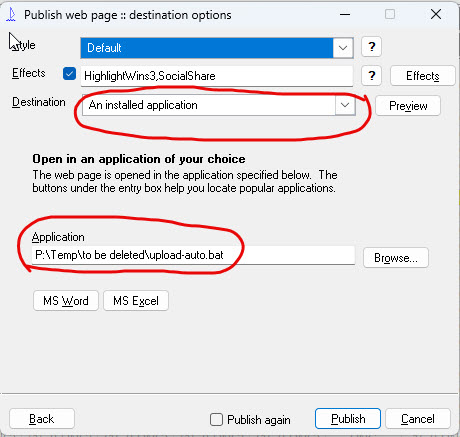
 

Select the destination as An installed Application
and the Application is where you saved the upload-auto.bat in my case, P:\Temp\to be deleted\upload-auto.bat. This should get remembered, so you don’t need to type this every time.
When you click Publish. You will be prompted for the file name you wish to use. It will automatically add an .htm extension if you don’t add one, or you can just press Enter, and you will get a random name, which you can then rename at a later date if you prefer
Note: this batch file contains your password, so store it in a directory that has the necessary permissions

For any discussions and use of this, please see the Sailwave User Group forum (https://forum.sailingresults.co.uk)

Updated Ratings available in Rating Library

Thank you to Huw who has created new Sailwave rating files for 2021 from the original sources

Not much changed this year due to the Covid-19 situation

  • 2021 RYA PN List – no changes to rating values just changes of year dates
  • 2021 RYA Limited Data PN List – one change of rating for National 18
  • 2021 SCHRS – no changes for 2021 so same as 2020
  • 2021 SCHRS PN Lookalike – no changes for 2021 so same as 2020
  • 2020-2021 Great Lakes Handicap List – this was updated in October

Downloads are available from
http://new.sailwave.com/rating-files-library

Sailwave acquires ezTrap

Sailwave (sailwave.com), the premier sailing results/scoring application for windows has acquired ezTrap, a unique MS Excel© based application for designing and managing sailboat racecourses. As with Sailwave, ezTrap is available as a free download for unrestricted use.

ezTrap has been available since 2009 and is in use by Race Officers around the world for Trapezoid, Windward/Leeward, Optimist; RS:X Slalom; 505 Worlds, Triangle, and Lipton Cup courses along with a flexible ‘round the buoys’ course for Yacht Clubs and other sailing associations.

Two of the biggest challenges with sailboat racing are significantly improved with ezTrap – set-up time and accuracy. To the best of our knowledge, it is the only app that instantly:

  • Provides Latitudes & Longitudes of all Marks & Pins;
  • Calculates BRGs & Distance of all Marks & Pins to/from RC Signals Boat;
  • Estimates sailing times by leg; and,
  • Scales up/down the course to meet Target Race Times for multiple fleets.

ezTrap was developed and supported by Ed Bottrell, Halifax, Nova Scotia, Canada, and will continue to be available from his website Bottrell.ca until the end of February 2021. Ed has retired and is pleased that Sailwave will continue to provide downloads and support through the Sailwave User Group. Future development and enhancements are possible with current and future Sailwave volunteers.

You can download the full version of ezTrap for free from the Download section of the Sailwave Website.  If you are just curious you can view the User Manual from the same section.

There is a new section in the Forum for ezTrap support – If you have any questions or suggestions please post them there.

Jon


Great Lakes Ratings file available

The 2020/21 Great Lakes PY list is now available for download from the Sailwave ratings library.    These should be downloaded to your ratings folder – The location of this folder is defined within Sailwave at Menu – Settings – Global options – Folders – My rating files.  The default location is C:\Users\Public\Documents\Sailwave\Ratings.  Sailwave allows you to have different rating folders so you can specify a subdirectory of this should you wish to have both these and RYA PY ratings available.  Thanks to Huw for creating the Sailwave format of them.

2020 RYA PY List available

The new 2020 RYA PY list is now available for download from the Sailwave ratings library.  Two files are available the standard PY list and the limited data list.  These should be downloaded to your ratings folder – The location of this folder is defined within Sailwave at Menu – Settings – Global options – Folders – My rating files.  The default location is C:\Users\Public\Documents\Sailwave\Ratings.  Sailwave allows you to have different rating folders so you can specify a subdirectory of this with different years as an example.  Thanks to Huw for creating the Sailwave format of them.

NEW 2019 RYA PN RATINGS AVAILABLE FOR DOWNLOAD

UPDATE 4th March 2019 – Due to some missing PY’s in the limited data file the  RYA have reissued it and the changes have now been reflected in the Sailwave rating files available for download.  If you have already downloaded them please update with the current version.

The new 2019 Portsmouth Numbers released today by the RYA are available for download from the rating file library of the Sailwave website.

There is also a limited data file of ratings for classes which have not received enough feedback to be included in this years updated ratings.  You can load multiple files with Sailwave if you place them in your ratings directory.

SCHRS and SCHRS PN equivalents have also been updated for 2019

You can examine and edit these file with a text editor or compatible spreadsheet.

Thanks to Huw Pearce for creating these files in Sailwave compatible format from the RYA  files

Possible down time

Wednesday 30th January – Essential network improvements
Scheduled for Jan 30, 21:00 – 22:00 GMT
Scheduled
As part of our continued investment in our infrastructure to improve your service, our Network team will be replacing a number of switches on Wednesday 30th January. Some customers may experience downtime during these essential works. We expect downtime to last no more than 1 hour. These works will begin at 9pm.

We understand your Heart Internet services are important to you and we are very sorry any potential downtime comes at such short notice. We have not taken this decision lightly and have decided to take immediate action so we can make the fix and maintain the quality of our service. We really appreciate you’re understanding and we will notify this page as well as social media as soon as the works has been completed.

Posted about 7 hours ago. Jan 29, 2019 – 14:08 GMT

New 2018 RYA PN Ratings available for download

The new 2018 Portsmouth Numbers are available for download from the rating file library of the Sailwave website.

There is also a historic file of ratings for classes  which have not received enough feedback to be included in this years updated ratings.  You can load multiple files with Sailwave if you place them in your ratings directory.

SCHRS and SCHRS PN equivalents have also been updated for 2018

You can examine and edit these file with a text editor or compatible spreadsheet.

Thanks to Huw Pearce for supplying the files